
Excessive complexity: a huge accessibility problem
Overly complex software interfaces can cause significant barriers for disabled people, but it’s not properly addressed by accessibility standards.
I think software is getting harder to use
I’ve been getting more and more annoyed when using various apps and websites. For some reason, I think software interfaces are actually getting worse in the age of AI, rather than better.
Someone with vision impairment, when presented with a simple interface that only contains a few buttons, might eventually learn the relative position of each button without needing to actually see or read the text. The interface then becomes easy to use, even with impaired vision.
But when presented with 15 different buttons in an interface, this sort of ‘muscle memory’ breaks down, and all text on the interface needs to actually be read in order to use the software.
iOS Safari zoom controls got harder to use
One example of this problem occurring is in Safari’s new page zoom setting on iOS 27.
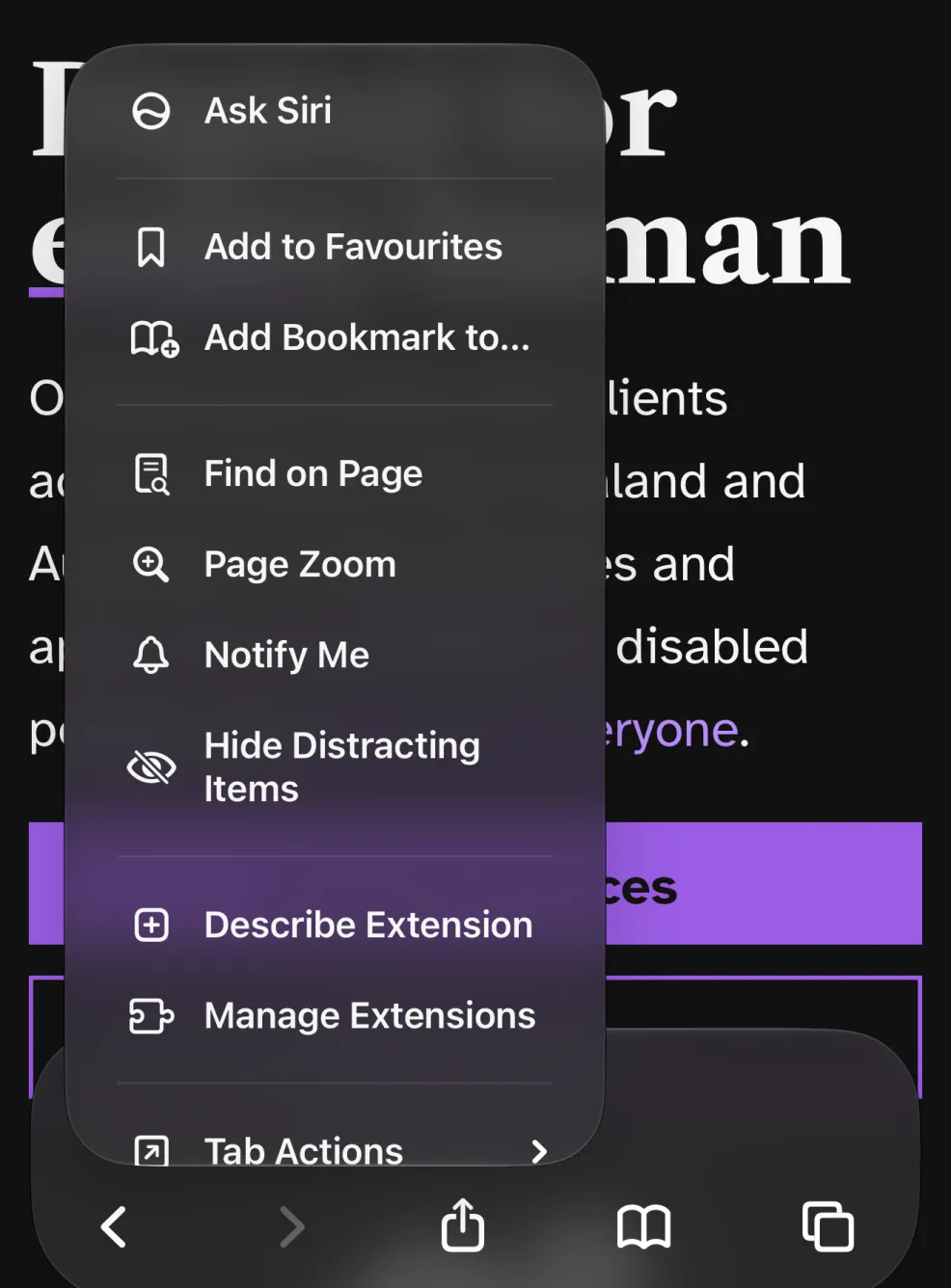
The setting for changing the page zoom is now buried in a giant menu of 16 items. This makes it very difficult for people with low vision to use; a frequently used feature (increasing font sizes) is now buried in a giant list of controls, which is so large that muscle memory cannot be used.
But if we look at the old page zoom design in iOS 26…
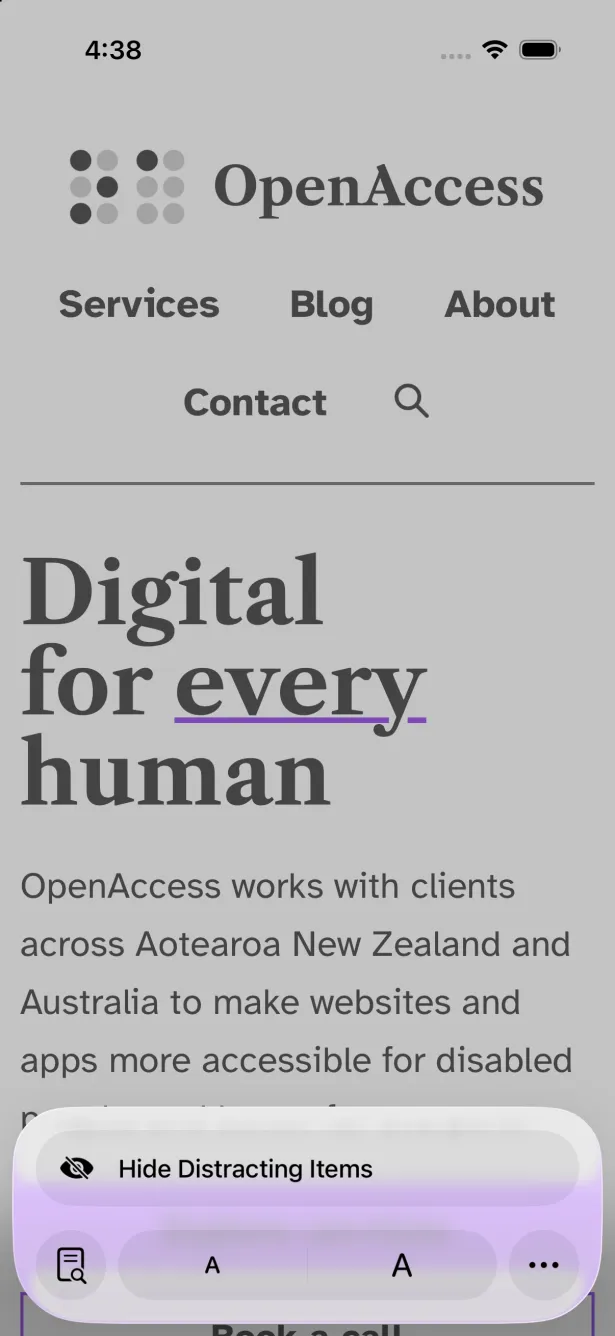
We can immediately see that this interface is infinitely more simple and clear than the new interface. It’s so simple it can be used with barely any vision; the page zoom controls are clear, and in a consistent location on the screen — perfect for muscle memory.
The page zoom interface went from an elegant, well-thought-out piece of UI design, to simply being slapped into a giant convoluted list of options.
Website navigations are getting harder to use
Let’s take a look at RNZ’s site navigation.
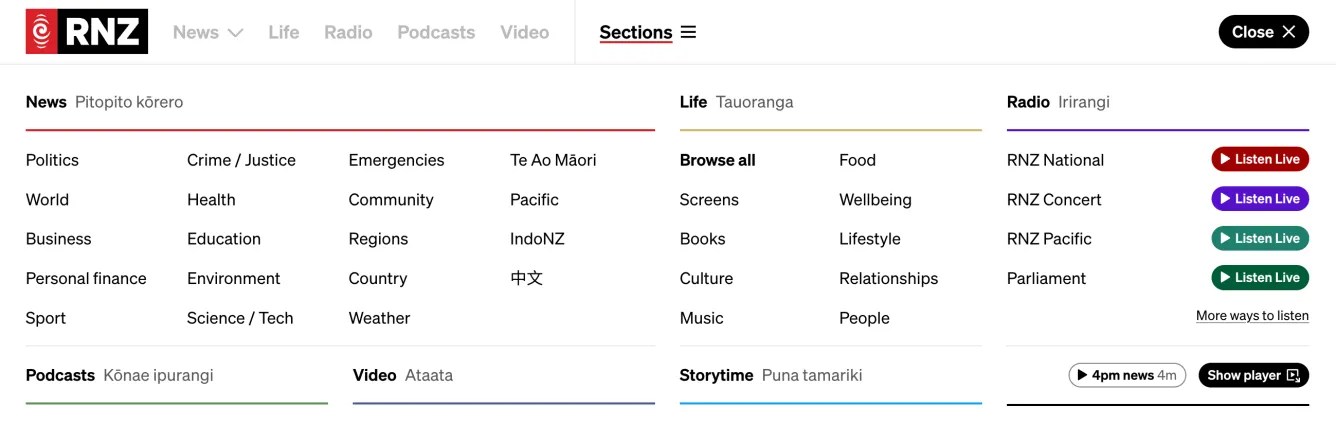
This navigation has FORTY-THREE possible options. I think most people would instantly find this overwhelming. To find the thing you need is almost like looking for a needle in a haystack.
This kind of website navigation is weirdly common, too. I think they call it a “mega menu” — it’s almost like UI designers realised these things are ridiculously huge and complicated (hence the name), but they stopped short of questioning whether the design is actually any good for users.
I think these mega menu designs are basically the UI designer’s junk drawer. Various functions and sections of the site just get thrown in the junk drawer, then the job’s done. Unfortunately the result is… well, junk.
Overly verbose web content
Another thing I’m noticing, and this is getting far worse because of AI vibe coding, is websites and apps that simply contain huge amounts of unnecessary text.
For whatever reason, AI freaking loves adding dozens of useless little text labels and explanations all throughout an interface. When I’m vibe coding a site, even though I tell the AI to not add unnecessary text, it still does it!
Here’s an example of the useless pieces of eyebrow text that AI slaps everywhere:

These bits of text are almost always completely pointless, and should be removed. It just makes stuff more complicated and noisy than it needs to be.
Accessibility standards fail to consider complexity
The main web accessibility standard we all look to, the Web Content Accessibility Guidelines (WCAG), is completely ineffective when it comes to preventing overly complex software.
User interface complexity is, to me at least, fairly obviously one of the most influential factors in whether a disabled person can successfully complete a task or not.
- If someone has vision impairment, of course it improves accessibility if there is less stuff to read, and controls are in consistent, predictable locations.
- If someone has a learning disability, of course reducing an app’s complexity will help with accessibility.
- If someone is blind and they listen to an app with a screen reader, of course the interface is easier to use if the function they need isn’t buried in a 17-item menu.
So why is it that accessibility standards totally fail to consider this seemingly critical aspect of accessible design? I think it’s inexcusable.
When I do my accessibility audits now, I always include clear feedback and recommendations on how to eliminate pointless complexity. Sadly I usually can’t point to the accessibility standard and explain which part of the standard it breaks. That’s not a failing of my assessments; it’s a failing of the standard itself.
So what should designers/developers do?
Minimalism in software design is really crucial for accessibility.
Be ruthless when it comes to removing buttons, links, and pointless pieces of text.
Do a few things, and do them well — and your software should work better for disabled people.
— Callum